

Connect CatChat to an IDE
To connect an IDE to the CatChat API system you will need to follow these steps:
- Request an API token as described in Access API
- Set your IDE to use “third party model provider” (or similar name)
- Point the IDE to the 'https://catchat-api.msu.montana.edu/v1’ endpoint
- Authenticate with your API token
You will need to use a Catchat API token to authenticate this with the API endpoints. Below is a screenshot of the configuration in the JetBrains IDE:
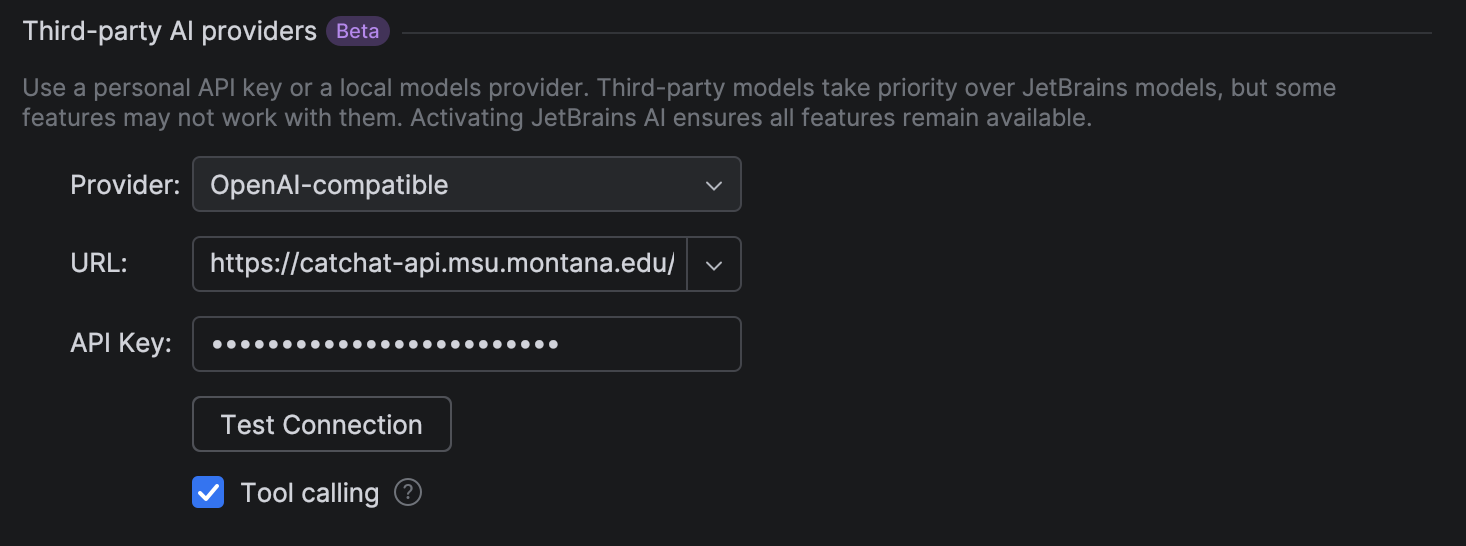
More information can be found on the configuration description for JetBrains, and the configuration description for VS Code.
If you are using OpenCode, add the following code to opencode.json. Located in ~/.config/opencode/opencode.json (Mac/Linux) or %USERPROFILE%\.config\opencode\opencode.json (Windows).
{
  "$schema": "https://opencode.ai/config.json",
  "provider": {
    "litellm": {
      "npm": "@ai-sdk/openai-compatible",
      "name": "CatChat",
      "options": {
        "baseURL": "https://catchat-api.msu.montana.edu/v1"
      },
      "models": {
        "gpt-oss:120b": {
          "name": "gpt-oss:120b"
        },
        "codegemma:7b": {
          "name": "Code Gemma"
        },
        "glm-4.7-flash:q8_0": {
          "name": "GLM 4.7"
        }
      }
    }
  }
}